|
|
|
|
|
This software was checked for viruses 17 days ago and was found to contain no viruses.
Click here
to see antivirus report.
|
|
| |
|
|
Video tutorial for High-Logic FontCreator 6.5
|
Review
This is official description
With over 2.5 million downloads to date, FontCreator is the world's most popular font editor. An advanced feature set makes it the tool of choice for professionals, and its intuitive interface is straightforward enough for users at any expertise level. Create your own fonts, redesign existing characters, edit the spacing in font sets, and much more.
The following review written by one of the Software Informer contributors applies to version 6.1
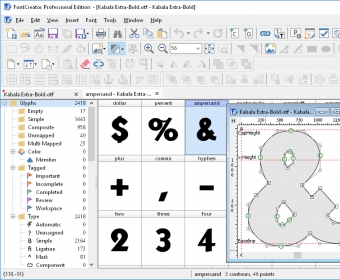
FontCreator is a program created by High Logic. As the name states, the purpose of this program is to create their own fonts. But not only that - you can manage and edit any already available set of fonts on your computer.
This program is actually very simple to use - once you open it, you can select one of the fonts installed in your system and you will be presented with a template of all the existing characters. You can add and remove characters according to your preferences. Once you have done that, you can open its pixel editor and start creating “your own” font. Of course, you will be presented with a large list of options to enhance your fonts, but you will only need some basic features to create your own font on the fly.
You can import and export graphic images that can be mapped into a font. If you've ever desired to have your own set of letters, this is definitely a program you should try. However, there is a catch to it - FontCreator can be downloaded to be used as a 30-day trial, but after that period, you will have to pay. “How much?”, you ask. A total of 79 dollars for home users - this price seems quite steep just for a tool to create fonts, and it is definitely a turn-off for many users. A great program dragged down by its price. |
- Easy to use.
- Quick and stable.
- Library Manager included.
|
|
|
Reviewed by: Ismael Mireles Reviewer rating: Reviewed: Last year
|
What's new in version 6.5
Added override range feature Updated registered vendor data User editable sample text in font test dialog Free Draw Enhanced the visual validation feedback within the glyph edit window Improved preview toolbar Auto correct postscript names on loading a font Support for OpenType fonts which exceed CFF Subroutine stack limits What's new in version 6.2
- Updated Unicode data to version 6.0 - Added Position transform feature - Improved import of vector based images - Extended composite data - Several new and updated transform scripts - Minor tweaks and bug fixes What's new in version 6.1
FontCreator version 6 contains many new features and improvements that will benefit type designers, font foundries, and power-users. The most impressive new feature that makes designing fonts so much faster is direct import of vector based images. This is the most reliable way to get illustrations made in vector based image editing software (like Adobe Illustrator) into FontCreator. |
|
Report a wrong version
Report a wrong program title
Suggest a correction
|
Screenshots
All 5 screenshots |